

TheBankTodayTheBankTodayTheBankToday
Notification Show More
Font ResizerAa
  • Home
  • Banking
  • SBI
  • ATM Card
  • NEFT/UPI
  • Central Bank
  • Important
Reading: Paytm Users Can Now Skip PIN for UPI Payments
Share
Font ResizerAa
TheBankTodayTheBankToday
  • Home
  • Banking
  • SBI
  • ATM Card
  • NEFT/UPI
  • Central Bank
  • Important
Search
  • Home
  • Banking
  • SBI
  • ATM Card
  • NEFT/UPI
  • Central Bank
  • Important
Have an existing account? Sign In
Follow US

Home » Wallet

Paytm Biometric result
Wallet

Paytm Users Can Now Skip PIN for UPI Payments

Takendra Verma
Last updated: 07/04/2026 2:48 PM
Takendra Verma
Published: 07/04/2026
Share
SHARE

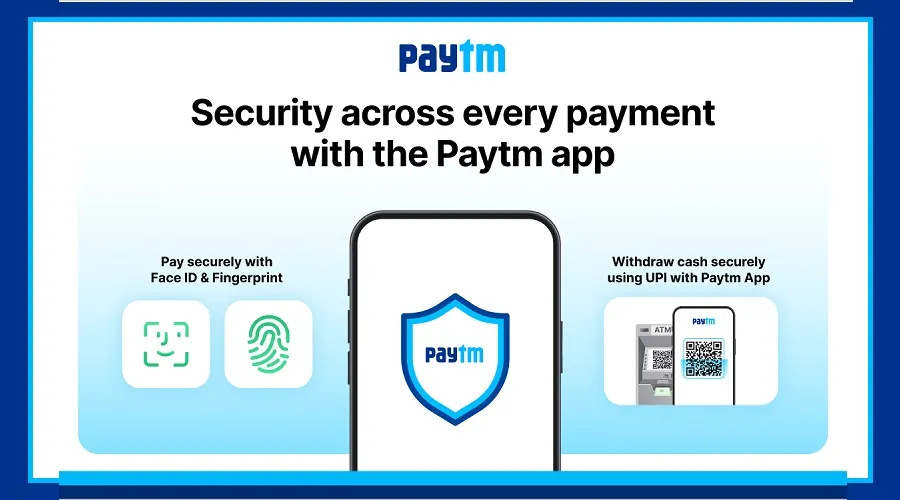
Paytm has introduced a powerful new update that makes transactions faster, easier, and more secure. With this update, users can now make UPI payments using fingerprint or face unlock, and even withdraw cash from ATMs without using a card.

Contents
UPI Payments Now Easier with Fingerprint and Face UnlockWithdraw Cash from ATM Without a CardHow to Enable Fingerprint Payment in PaytmHow to Withdraw Cash Without an ATM Card

These features are designed to improve both convenience and safety for everyday users.

UPI Payments Now Easier with Fingerprint and Face Unlock

Paytm has added a biometric authentication feature to its app. This allows users to make UPI payments using their fingerprint or face instead of entering a PIN every time.

Now, you simply unlock your phone and confirm the payment. There’s no need to remember or type a UPI PIN again and again.

This feature not only saves time but also increases security. Since fingerprint and face data are unique to each user, the chances of fraud are much lower.

Withdraw Cash from ATM Without a Card

Another major update is the cardless ATM withdrawal feature. Users can now withdraw money from ATMs without carrying their ATM card.

To use this feature, open the Paytm app and select the cash withdrawal option. Then, go to an ATM that supports QR code scanning. Scan the QR code on the ATM screen and complete the authentication process.

Once verified, the ATM will dispense cash.

This feature is especially useful for people who often forget their ATM cards or do not remember their PIN.

How to Enable Fingerprint Payment in Paytm

To use biometric payments, first update the Paytm app to the latest version.

Open the app and go to the Profile or Settings section. Look for the Security or Biometric Authentication option and enable fingerprint or face unlock.

After enabling this, whenever you make a UPI payment, you will be asked to authenticate using your fingerprint or face instead of entering a PIN.

How to Withdraw Cash Without an ATM Card

Withdrawing cash without a card is simple and quick.

Open the Paytm app and select the “Cash Withdrawal” or “ATM Withdrawal” option. Enter the amount you want to withdraw. The app will generate a QR code or request.

Now visit a nearby ATM that supports QR-based withdrawals. On the ATM screen, choose the “Cardless Withdrawal” or QR Scan option and scan the code using your Paytm app.

After authentication, your cash will be dispensed.

You Might Also Like

Trust Mutual Fund launches Midcap Fund
Start with Rs 50,000 and Earn Crores with Mahogany Trees
LIC MF launches New Consumption Fund
New Debt and Equity Mutual Fund NFOs launched
Mutual Fund Investment Now available at Post Offices
Share This Article
Facebook Email Print
Leave a Comment

Leave a Reply Cancel reply

Your email address will not be published. Required fields are marked *

Difference Between NEFT and RTGS

Get Banking Updates

Important banking and money updates, delivered without the clutter.
Thank you! Please check your inbox to confirm your subscription.
Popular Updates
SBI Asha Scholarship
SBI Asha Scholarship 2023: विद्यार्थियों को मिल रही 5 लाख की स्कॉलरशिप
31/07/2023
fd
RBI Changes FD Interest Rate Rules From October 1
22/09/2026
How to register YONO SBI
How to register YONO SBI in Just 5 minutes
11/05/2023
check balance from SBI ATM
How to check Balance from SBI ATM?
30/07/2023
How to check Balance in SBI
How to check Balance in SBI in 2023?
18/02/2023

Tags

  • Central Bank Of India
  • Pan Card
  • register mobile number
  • pan card new rule
  • Banking Service
  • HDFC
  • SBI Personal Loan
  • Net Banking
  • Activate Net Banking
  • What is Bank?

TheBankToday

TheBankToday publishes practical banking, personal-finance and financial-news explainers to help readers understand important updates and services.
Quick Links
  • About
  • Contact Us
  • Disclaimer
  • Join Us
  • T&C
  • Privacy Policy
  • Customize Interests
Important Links
  • Advertise With Us
  • Advertising Policy
  • Cookie Policy
  • Corrections Policy
  • Editorial Policy
  • Fact-Checking Policy
  • Grievance Redressal

Subscribe Us

Subscribe to our newsletter to get our newest articles instantly!

Thank you! Please check your inbox to confirm your subscription.
© 2026 TheBankToday. All Rights Reserved.
Welcome Back!

Sign in to your account

Username or Email Address
Password

Lost your password?